Fusion Business PowerPoint: A Practical Evaluation for Professional Presentations
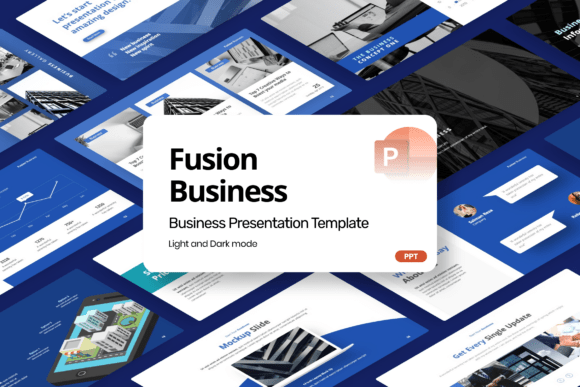
Fusion Business PowerPoint is a purpose-built corporate presentation template designed for clarity, consistency, and visual authority. It’s not a generic deck with placeholder content—it’s a cohesive system of slides built around real-world business communication needs: company profiles, startup pitches, financial reporting, project proposals, marketing strategy overviews, and data-driven corporate analytics. What sets Fusion Business PowerPoint apart is its editorial discipline: layouts avoid visual clutter while supporting bold typography, intentional whitespace, and structured infographic elements that clarify—not obscure—complex information.
What Makes Fusion Business PowerPoint Distinct in Practice?
Unlike many presentation templates that prioritize decorative flair over function, Fusion Business PowerPoint emphasizes structural logic. Each slide serves a defined communicative role—for example, a “Team Structure” layout uses layered hierarchy rather than circular diagrams, making reporting lines or functional groupings instantly legible. Financial summary slides integrate editable charts with minimal axis labels and clear callouts, reducing interpretation time during high-stakes meetings. The template also avoids overused design tropes: no gradient-heavy title slides, no excessive iconography, and no forced 3D effects. Instead, it relies on contrast, alignment, and typographic rhythm to signal importance and guide attention.
The inclusion of a comprehensive help guide—and the fact that all fonts are embedded and freely licensed—means users aren’t stalled by licensing ambiguity or font substitution issues. That’s especially valuable when collaborating across teams or submitting decks to clients who may not have access to premium typefaces. All slides are fully editable in standard PowerPoint (no add-ins or cloud dependencies), and the 16:9 widescreen ratio aligns with modern display standards used in conference rooms, remote presentations, and recorded walkthroughs.
How It Compares to Other Corporate Template Approaches
When evaluating presentation resources, users often encounter three broad categories: modular slide libraries (collections of isolated, reusable slides), full-theme templates (like Fusion Business PowerPoint), and AI-assisted design tools. Fusion Business PowerPoint sits firmly in the second category—but with notable differences in execution.
Modular libraries offer flexibility but require significant assembly time and design judgment. You might find a strong “SWOT analysis” slide, but then struggle to match its color scheme, spacing, or icon style with your “Market Opportunity” slide. Fusion Business PowerPoint eliminates that friction by delivering a unified visual language across all 30+ slide types. There’s no need to reconcile inconsistent line weights or mismatched grid systems—the coherence is baked in.
AI-powered presentation tools promise speed, but they often lack editorial control. They may generate dozens of variations of the same concept without understanding contextual nuance—like whether a financial summary should emphasize YoY growth or margin compression. Fusion Business PowerPoint doesn’t automate content creation; instead, it streamlines formatting, structure, and consistency so presenters can focus on substance, not styling.
Compared to free or open-source templates, Fusion Business PowerPoint trades breadth for precision. Many free options include 100+ slides, but a large portion are redundant or stylistically inconsistent. Fusion Business PowerPoint offers fewer slides—but each one solves a specific, recurring business communication challenge with intentionality.
Strengths and Realistic Tradeoffs
Strengths:
- Editorial cohesion: Typography, color logic, and layout conventions remain consistent across sections—critical when presenting to executives or investors who scan quickly.
- Infographic readiness: Charts, flow diagrams, and comparison matrices use editable vector shapes—not raster images—so resizing or recoloring preserves quality.
- Low learning curve: No custom XML, no macros, no external dependencies. If you know how to change text and swap a chart, you can customize it confidently.
- Agency- and consultant-friendly: Includes branded slide variants (e.g., “Client Overview,” “Scope of Work,” “Deliverables Timeline”) that reflect common service delivery contexts.
Tradeoffs:
- No stock imagery included: All image placeholders require user-supplied assets. This maintains flexibility but adds a step for those expecting plug-and-play visuals.
- Not animation-heavy: Transitions and builds are subtle and functional—not cinematic. If your use case demands dynamic motion (e.g., explainer videos or investor roadshow reels), you’ll need to extend beyond the base files.
- Designed for PowerPoint only: While export to PDF or Google Slides is possible, advanced layering or master slide behaviors may not translate cleanly—especially in collaborative online environments.
Where Fusion Business PowerPoint Fits Best
Fusion Business PowerPoint shines in situations where credibility, clarity, and consistency matter more than novelty. Consider it when:
- You’re preparing a pitch deck for seed-stage investors who review hundreds of proposals—clean formatting helps your differentiators stand out without distraction.
- Your team delivers recurring client presentations (e.g., quarterly performance reviews) and needs a shared, updatable framework—not ad-hoc decks that drift stylistically over time.
- You work in finance, strategy, or operations and regularly distill complex data into board-ready summaries—where precise labeling, logical sequencing, and unambiguous visuals reduce follow-up questions.
- You’re a solo consultant building a professional brand and want every deliverable to reinforce competence through polish—not just content.
It’s less ideal if your workflow depends heavily on real-time co-editing in Google Slides, or if your audience expects highly interactive elements like embedded dashboards or clickable navigation layers. Similarly, if your presentations rely on custom photography, video integration, or animated storytelling, you’ll likely supplement Fusion Business PowerPoint with additional tools—not replace them.
Making an Informed Choice Among Options
Choosing a presentation template isn’t about finding the “best” one—it’s about matching design infrastructure to your actual workflow, audience expectations, and long-term maintenance needs. Fusion Business PowerPoint excels when your priority is minimizing formatting decisions so you can invest more time in message development, stakeholder alignment, and rehearsal.
Ask yourself: Do you spend more time adjusting bullet spacing than refining your value proposition? Are your decks frequently flagged for inconsistent branding across departments? Do reviewers comment on unclear charts or overcrowded slides—not weak insights? If yes, Fusion Business PowerPoint addresses those friction points directly.
Compare it not just to other templates, but to your current process. If you’re assembling decks from scratch using default PowerPoint themes, the time saved—even just in consistent title formatting or standardized financial chart styling—can add up to several hours per major presentation. Over six months and four key decks, that’s easily a full workday reclaimed.
Also consider scalability. A freelancer using Fusion Business PowerPoint today can hand off the same file to a new team member tomorrow with minimal ramp-up. An agency can embed it into onboarding—ensuring junior staff produce client-facing materials that meet brand standards without constant oversight. That kind of operational reliability is hard to quantify but easy to feel when deadlines loom and consistency matters.
Final Considerations Before Use
Before downloading or purchasing, verify compatibility with your version of PowerPoint (the template works with PowerPoint 2019 and later, including Microsoft 365). Review the help guide first—it clarifies how master slides function, how to update global colors, and how to manage layered infographic elements without breaking alignment. And remember: even the strongest template won’t compensate for underdeveloped messaging. Fusion Business PowerPoint supports strong communication—it doesn’t replace it.
If your goal is to communicate complex business ideas with confidence, precision, and quiet professionalism—not flash—Fusion Business PowerPoint provides a grounded, adaptable foundation. It won’t make your data more insightful, but it will ensure your insights land as intended.