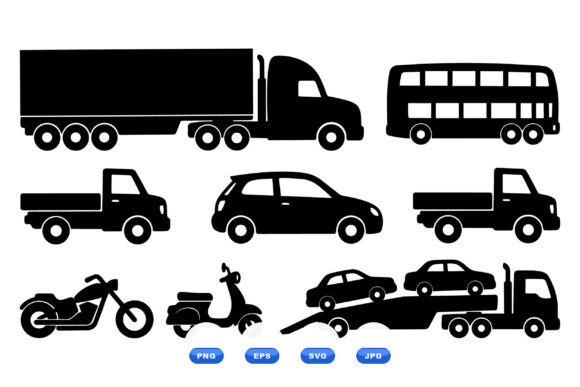
Vehicle Silhouette Clipart Pack
If you’ve ever spent 20 minutes searching for a clean, scalable car or truck icon—only to land on blurry PNGs, overdesigned vectors, or licensing traps—you’ll appreciate what the Vehicle Silhouette Clipart Pack delivers: precision, flexibility, and zero friction.
This isn’t decorative clipart. It’s a purpose-built vector toolkit—100% black-and-white, high-contrast silhouettes of transport vehicles in consistent side-view orientation. Think sedans, SUVs, pickup trucks, delivery vans, motorcycles, buses, cargo trains, airplanes, and even bicycles and scooters—all drawn with tight line integrity and intentional negative space. Every shape is optimized for legibility at small sizes (like app icons or dashboard widgets) and retains razor-sharp clarity when scaled to billboard dimensions.
Why Simplicity Wins in Real Projects
Clarity matters more than ornamentation in most professional contexts. A marketing team designing a logistics SaaS dashboard doesn’t need shadows, gradients, or chrome effects—they need instantly recognizable vehicle forms that align with their brand’s visual language. The Vehicle Silhouette Clipart Pack answers that need with deliberate minimalism: no gray tones, no outlines, no stylistic compromises. Just pure vector shapes—black on white or white on black—that integrate seamlessly into UI kits, infographics, presentations, and print collateral.
Because all artwork is built as native vector paths (SVG and EPS), resizing introduces zero quality loss. You’re not “stretching pixels”—you’re recalculating geometry. That means the same bus silhouette works equally well as a 16×16 favicon and a 30-inch trade show banner. No reworking. No pixel-perfect retouching. Just drag, drop, and go.
What’s Inside the ZIP—and Why File Format Variety Matters
The download includes four formats—SVG, PNG, JPG, and EPS—each serving distinct roles:
- SVG: Your go-to for web use, responsive interfaces, and editable vector workflows (Figma, Illustrator, Affinity Designer). Supports CSS styling, animation, and accessibility attributes like
aria-label. - EPS: Industry-standard for print production and legacy design suites. Essential if you’re handing files to a commercial printer or using older Adobe versions.
- PNG: Transparent-background raster option—ideal for quick insertion into PowerPoint, Canva, Google Slides, or social media graphics where vector support isn’t available.
- JPG: High-res, flattened raster for email newsletters, blog posts, or CMS uploads where transparency isn’t required and file size must be lean.
No upsells. No “premium add-ons.” Just one ZIP folder, organized intuitively, with filenames that match vehicle types (e.g., truck-delivery-side.svg, motorcycle-scooter-side.png). No renaming required. No hunting through layers named “Group 7_copy_final_v3.”
Where These Silhouettes Actually Get Used
Designers and content creators reach for this pack in scenarios where speed, consistency, and scalability intersect:
- A freelance UX designer building a fleet management dashboard uses the van and truck silhouettes as interactive map markers—SVG lets them change color on hover without exporting new assets.
- An educator creating a transportation unit for middle school students drops the train, airplane, and bicycle icons into an illustrated timeline PDF—EPS ensures crisp output whether printed or viewed on tablets.
- A small business owner launching a local moving service adds the pickup truck and cargo van silhouettes to their website hero section and business cards—same asset, two very different applications, zero redesign.
- A content marketer illustrates a blog post about EV adoption rates with layered vehicle icons beside stats—PNGs with transparency let them overlay cleanly on gradient backgrounds without white boxes.
- A nonprofit communications lead builds an annual report infographic comparing urban transit modes—consistent silhouette style keeps the data visual cohesive, not distracting.
Branding & Communication Benefits You Can Measure
When your visuals share a unified graphic language—same weight, same proportion logic, same contrast ratio—readers subconsciously register coherence. That builds trust. It signals intentionality. In branding, that cohesion reduces cognitive load: users don’t pause to decode inconsistent styles; they absorb your message faster.
For example, replacing generic stock icons with these silhouettes in a client presentation subtly reinforces professionalism. The clean lines say “we pay attention to detail,” while the lack of visual noise keeps focus on your data, strategy, or story—not the decoration.
Practical Considerations Before You Download
While the Vehicle Silhouette Clipart Pack excels in versatility, it’s worth noting its intentional constraints—so you know exactly what you’re getting:
- No color variants included. All silhouettes are monochrome. If your project demands full-color vehicles, this isn’t the solution—but it’s ideal if you control your palette (e.g., applying brand colors via CSS or layer fill).
- No front/rear/isometric views. This is strictly side-profile. That’s a strength for consistency—not a limitation—unless your use case specifically requires multi-angle representation.
- No custom illustration requests. This is a ready-made set—not bespoke work. But the 100+ vehicles cover common categories used across logistics, mobility, education, and civic planning.
- Licensing is straightforward. Royalty-free for both personal and commercial use—including client projects—no attribution required. Always verify the license terms included in your download, but standard usage covers websites, apps, print, merchandise, and internal tools.
If you’re evaluating clipart packs, ask: Does it save time *today*? Does it scale with your needs next quarter? Does it look intentional—not just “available”? The Vehicle Silhouette Clipart Pack was built for those questions. It’s not flashy. It’s functional. And in real-world creative work, that’s often the highest compliment.